Radiological management
Open the lab's Rad Summary
Expand the lab section and select Rad Summary, or select Rad in the lab's upper navigation.
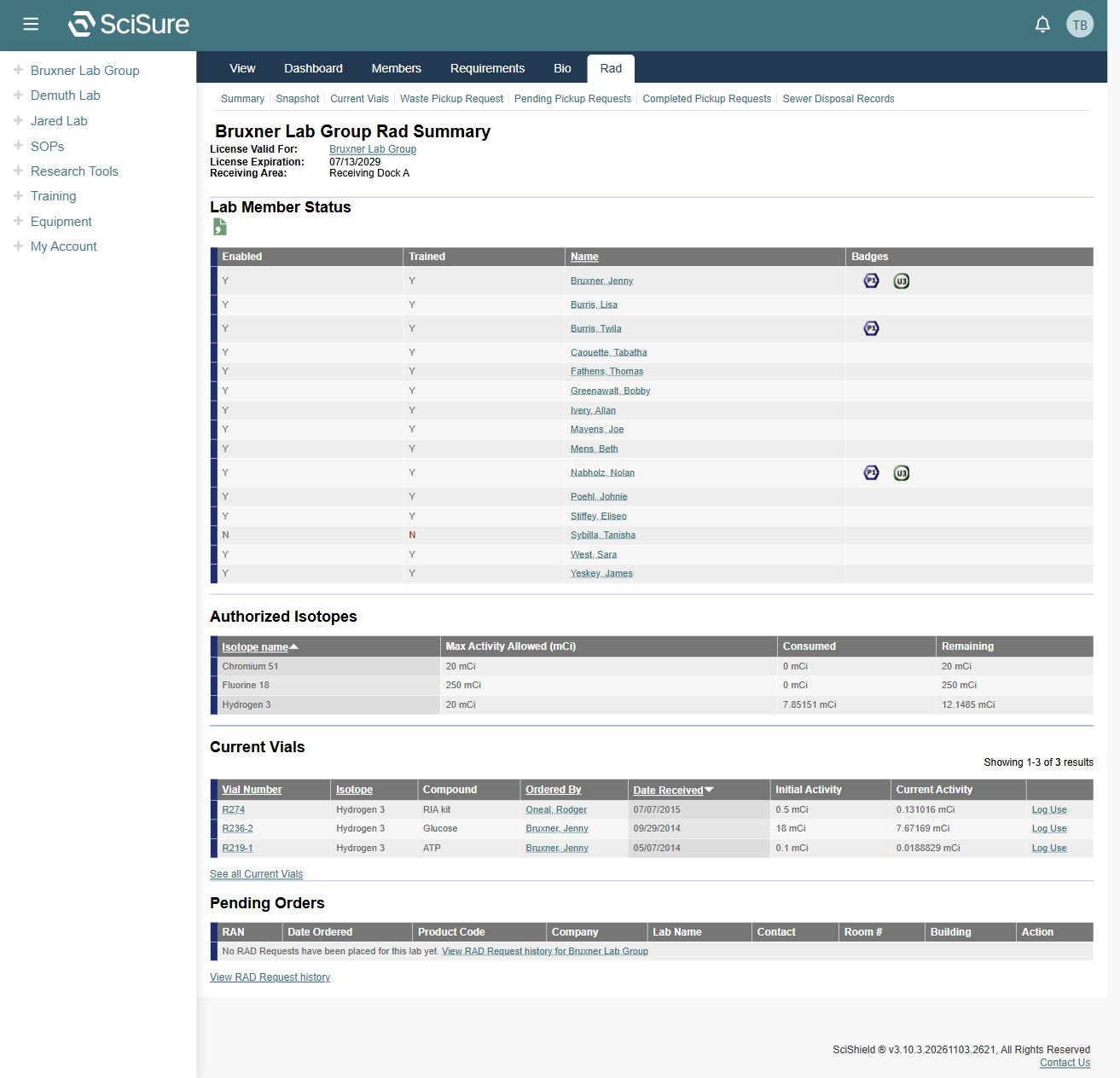
The captured summary shows the lab for which the license is valid, license expiration, and receiving area. Check the lab identity before interpreting the inventory or authorization.
Review people and isotope authorizations
Lab Member Status lists Enabled, Trained, Name, and Badges. The inspected record uses Y/N indicators for enabled and trained. They are separate columns; verify both and consult the responsible staff if a status appears wrong.
Authorized Isotopes shows the isotope name, maximum activity allowed, consumed activity, and remaining activity. The captured table labels maximum activity in mCi. Preserve the displayed units when discussing a record.
These values are application records. This guide does not establish authority to order, receive, use, or dispose of radioactive material.
Find current vials
The summary's Current Vials table shows Vial Number, Isotope, Compound, Ordered By, Date Received, Initial Activity, and Current Activity. Vial numbers are links. The page exposes Log Use text and See all Current Vials; the navigation also includes Current Vials.
Open the appropriate vial record before recording any use. The log-use form, calculation rules, decay behavior, and save/confirmation flow were not inspected or tested.
Orders and requests
The summary has a Pending Orders section and View RAD Request history links. The captured lab had no pending RAD requests. The sidebar exposes Rad Request as an entry point.
Order creation, supplier selection, delivery handling, approvals, and request cancellation were not inspected. Use the live form and institutional workflow when carrying out those tasks.
Waste pickup and disposal navigation
Observed tabs include:
| Tab or link | Purpose indicated by the UI |
|---|---|
| Summary | Current lab overview |
| Snapshot | Separate inventory snapshot view |
| Current Vials | Vial listing |
| Waste Pickup Request | Request entry point |
| Pending Pickup Requests | Pending pickup list |
| Completed Pickup Requests | Completed pickup history |
| Sewer Disposal Records | Disposal record list |
The lab sidebar also has Rad Waste Pickup. The underlying request fields, disposal controls, and final actions were not exercised.
Resolve conflicting license dates
The captured compliance dashboard and Rad Summary displayed license dates one day apart. This is recorded as a documentation observation, not a diagnosed cause. Ask radiological compliance staff to confirm the authoritative source if a date affects your work.
Related: Compliance dashboard, Equipment, Important Contacts.